Iframe Sandbox Settings Explained: allow-popups, allow-modals, and Pointer Lock
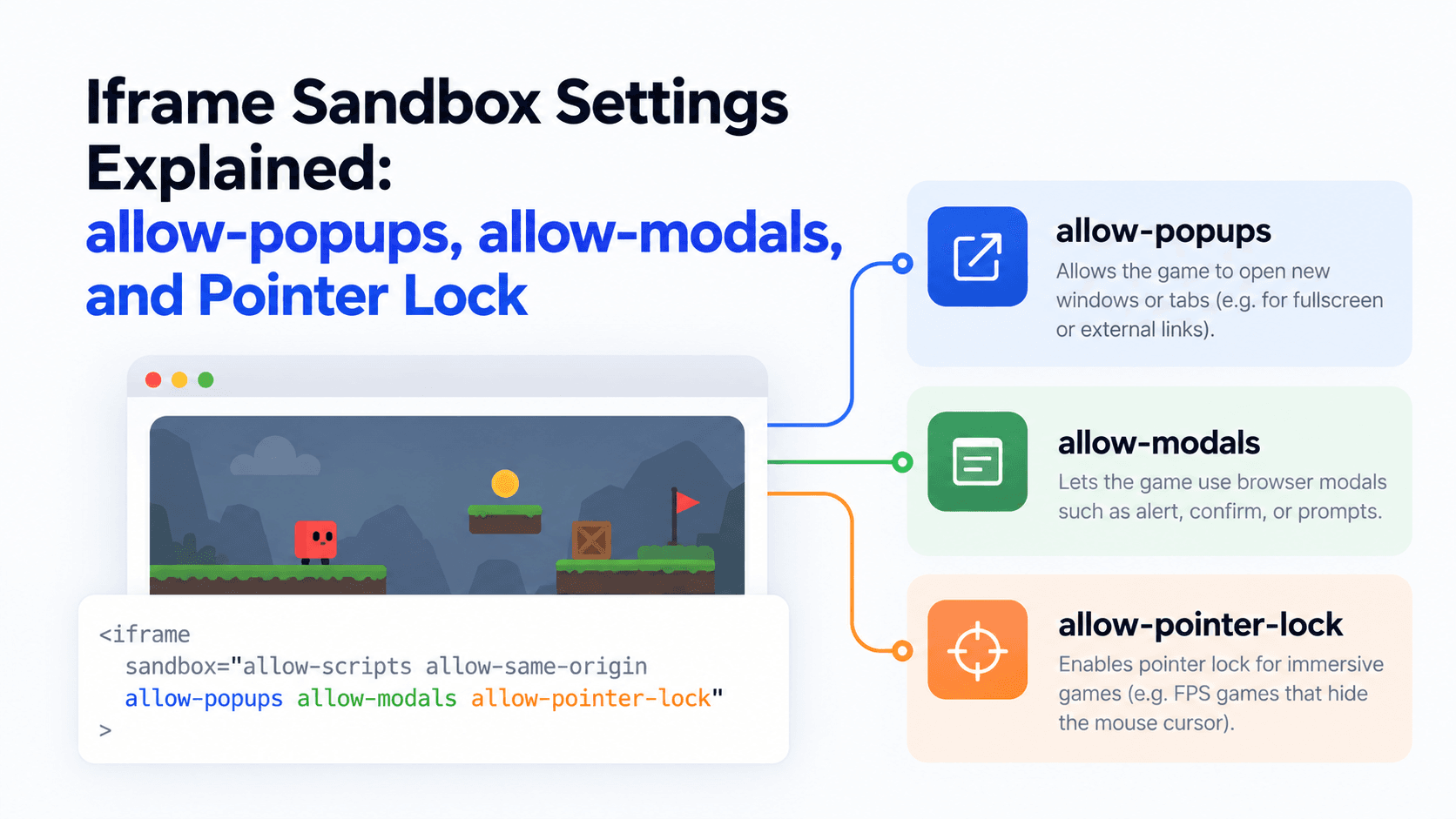
Most broken game embeds aren't a broken game, they're a missing permission. The sandbox and allow attributes on an iframe control what the framed content is actually allowed to do, and getting the balance wrong breaks things in either direction.
Why Sandbox Exists at All
By default, browsers restrict what content inside an iframe can do, since you're effectively running someone else's code on your page. The sandbox attribute lets you selectively lift specific restrictions rather than leaving everything wide open. An empty sandbox="" is maximally restrictive, and you add flags back one at a time for what the game actually needs.
The Flags That Matter Most for Games
- allow-scripts lets the framed content run JavaScript. Almost every HTML5 game needs this, without it, nothing will work at all.
- allow-same-origin lets the frame be treated as coming from its own origin rather than a restricted, opaque one, often required alongside scripts for the game to function correctly.
- allow-popups permits the game to open new browser tabs or windows. Some games use this for things like a "share your score" link or an external ad, without it, those actions will silently fail.
- allow-modals permits browser-level dialogs like alert() or confirm(). Some games use these for simple prompts, without this flag, the dialog just won't appear.
- allow-forms allows form submission inside the frame, relevant if a game has any kind of in-frame input beyond gameplay itself.
For a feel of a mouse-driven game inside an iframe, try the one below. It is a first-person shooter and, as its badges show, desktop only. PlayKovo's default embed code sets the allow attribute to "fullscreen; autoplay; gamepad; pointer-lock" so games like this work without extra setup.
Try it live · PlayKovo catalog
Free browser multiplayer first-person shooter. Aerial action, score points for spectacular combos!
Pointer Lock Is a Separate, allow-Based Permission
Separate from sandbox, the allow="pointer-lock" permission (set in the allow attribute, not sandbox) lets a game capture and hide your mouse cursor, standard for any first-person or camera-drag style game. Without it, mouse-look controls typically won't work correctly, since the browser won't let the game take control of the cursor.
Why a Provider Saying "Needs Popup Permission" Is Normal
If a game's documentation specifically calls out needing allow-popups or allow-modals, that's not a red flag by itself, plenty of legitimate games use a native alert() for a simple message, or open a new tab for a "share" link or an ad. The flag exists because the browser needs explicit permission to allow it, not because the request itself is unusual.
The Real Tradeoff
Grant too little, and the game looks broken, a black screen, a frozen cursor, a share button that does nothing. Grant too much, and you're giving embedded, third-party content broader access to browser behavior than it necessarily needs, which is the actual security tradeoff sandbox exists to manage. The right approach is granting exactly what a specific game's documentation says it needs, not defaulting to maximally open or maximally restrictive.
FAQ
Why does my embedded game show a black screen or not respond to clicks?
Often a missing allow-scripts or allow-same-origin flag in the sandbox attribute, without them the game's code may not run at all.
What does pointer-lock do for a game embed?
It lets the game capture and hide the mouse cursor, required for first-person or camera-drag controls to work correctly.
Is it risky to grant allow-popups to an embedded game?
It's a real permission to weigh, but plenty of legitimate games need it for features like sharing a score or opening an ad in a new tab, it's not inherently a red flag.
What's the safest default for sandbox settings?
Start restrictive and add only the specific flags the game's own documentation says it needs, rather than granting everything by default.
Final Thoughts
Sandbox and allow attributes are the difference between an embed that just works and one that looks mysteriously broken. Match the flags to what the specific game actually needs, and most embedding problems disappear before they start. If you'd rather use a ready embed code instead of guessing which flags a specific game needs, PlayKovo's catalog provides working embed codes for its games directly.
Related Posts
How to Choose the Right HTML5 Games for Your Website's Audience
A five-criteria scoring system for picking embeddable HTML5 games that fit a news site, blog, game portal or community, with a worked example using real PlayKovo catalog games.
A Curated 20-Game Starter Library for a New Arcade Website
Twenty embeddable HTML5 games from the PlayKovo catalog, balanced across puzzle, casual, arcade, action and sports, with controls, device support and publishing notes for each.
How to Compare Free HTML5 Game Catalog Providers Before Embedding
An independent checklist and scoring grid for comparing HTML5 game catalog providers, applied to PlayKovo, Playgama and GameMonetize using only what each publishes.