3 Ways to Add Free Games to Your Website (Embed Code, JSON Feed, or CMS Block)
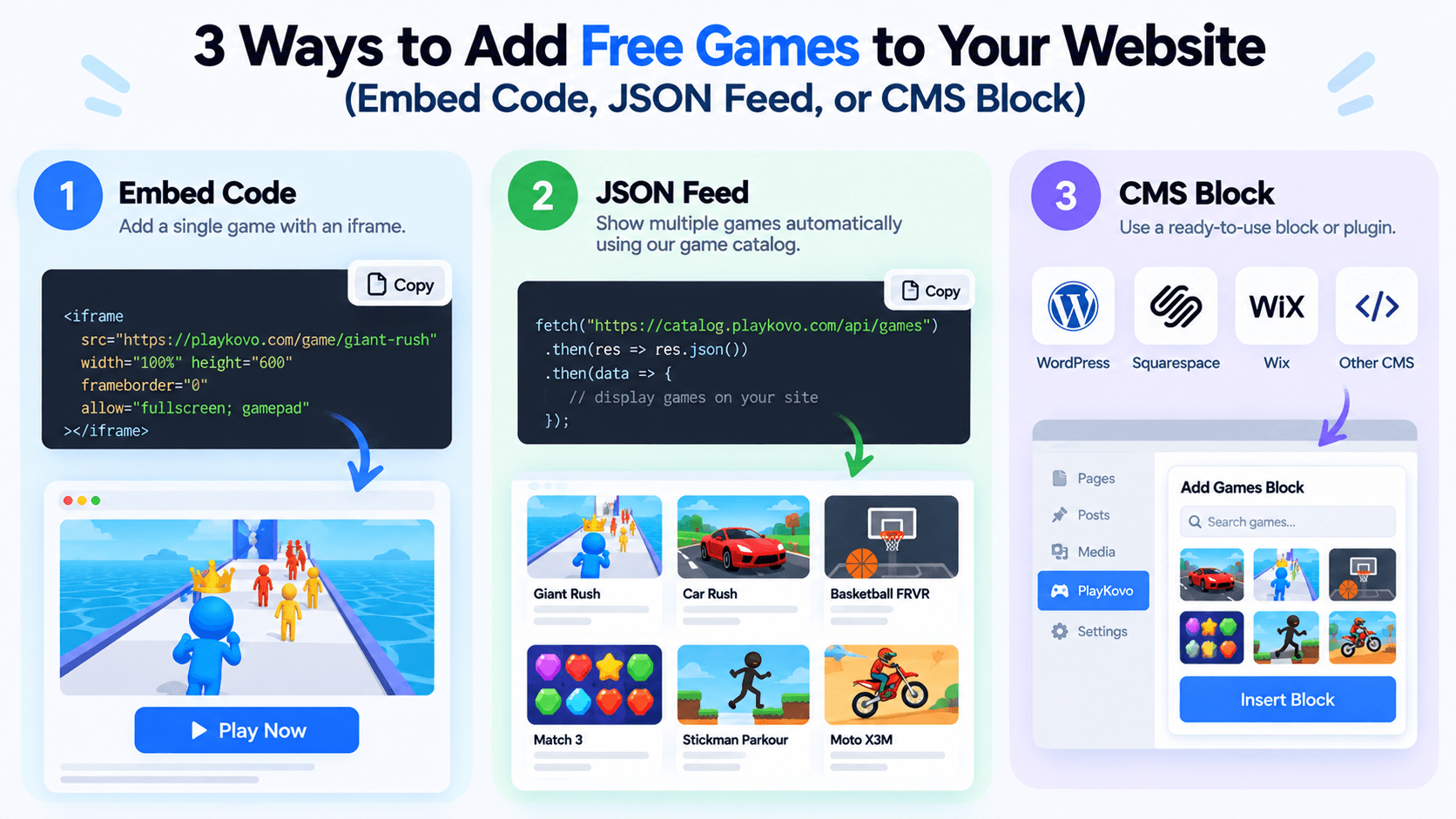
"Add a game to the site" and "build a games section with fifty titles that stays current" are really different projects, even though both start with the same iframe technology. Here are the three practical approaches, and when each one actually fits.
1. A Single Embed Code
The simplest option: copy one iframe embed code for one specific game and paste it into a page. This works well when you want one or two games on a specific page, a waiting screen, a blog post about that game, a fun 404 page, anything where you're not trying to maintain a catalog.
Best for: a single game, added once, that doesn't need to change automatically.
This is a single embed in action: one iframe, one game, nothing else to maintain.
Try it live · PlayKovo catalog
Shove your rivals off a shrinking sumo platform in this fast and funny .io brawler. Bump, dash and outsmart the crowd to be the last fighter standing, then spend your coins on hats and…
2. A JSON or XML Feed
Instead of hardcoding individual embed codes, a feed gives you structured data, titles, categories, thumbnails, embed URLs, device support, for many games at once. Your page fetches the feed and renders a catalog from it, which means adding or removing games from the source feed updates your page automatically, without you touching your site's code again.
Best for: an actual games section with many titles that you want to stay current without manual upkeep. PlayKovo's catalog offers this specifically, letting you download a JSON feed of the games you've selected instead of maintaining individual embed codes by hand.
The cards below are the feed approach: their titles, artwork and Desktop/Mobile badges are read from PlayKovo's public feed rather than written by hand.
Try it live · PlayKovo catalog
Short description: Loop your tail around hexagonal tiles to capture territory, dodge rivals, and become the King of the map in this free 3D multiplayer .io game.
Explore a dreamlike world of floating pastel islands, ring the wind chimes in order, and glide between the clouds.
3. A CMS-Specific Embed Block
If your site runs on WordPress or another CMS, a dedicated embed block or plugin can wrap the iframe setup into something you configure through the CMS editor rather than raw HTML. This trades some flexibility for convenience, useful if you don't want to touch code directly for every game you add.
Best for: non-technical site owners adding a handful of games through a page builder or CMS editor.
Quick Comparison
- Want one game, once? A single embed code is the least overhead.
- Want a real, evolving games section? A JSON feed keeps your catalog current without manual edits every time something changes.
- Want to avoid touching code entirely? A CMS embed block trades some control for ease of use.
FAQ
What's the simplest way to add one game to my site?
A single iframe embed code pasted directly into the page, no feed or catalog system required.
Why would I use a JSON feed instead of individual embed codes?
A feed keeps a multi-game catalog page current automatically, since changes to the source feed reflect on your page without manual edits.
Is a CMS embed block different from a raw iframe?
Not fundamentally, it's usually the same iframe technology wrapped in a CMS-friendly configuration interface.
Where can I get a feed of embeddable games instead of building my own list?
PlayKovo's catalog lets you choose games and download a JSON feed for your own site, rather than compiling embed codes manually.
Final Thoughts
The right approach depends entirely on scale: one embed code for a single game, a feed for a real catalog, or a CMS block if you'd rather not touch markup at all. If you're building a proper games section, browsing PlayKovo's embeddable catalog is a faster starting point than assembling individual embed codes one game at a time.
Related Posts

How to Choose the Right HTML5 Games for Your Website's Audience
A five-criteria scoring system for picking embeddable HTML5 games that fit a news site, blog, game portal or community, with a worked example using real PlayKovo catalog games.
A Curated 20-Game Starter Library for a New Arcade Website
Twenty embeddable HTML5 games from the PlayKovo catalog, balanced across puzzle, casual, arcade, action and sports, with controls, device support and publishing notes for each.
How to Compare Free HTML5 Game Catalog Providers Before Embedding
An independent checklist and scoring grid for comparing HTML5 game catalog providers, applied to PlayKovo, Playgama and GameMonetize using only what each publishes.